

Sale Now On Selected Products / Services - Remember to check our products and Services pages.
Please note: • Errors and omissions excepted (E&OE) on this site
Cybersecurity & Enterprise Threats
Why protecting your identity online now requires more than strong passwords
The internet is always evolving, and so are the bad actors that threaten your cybersecurity. Alongside the classic method of attempting to compromise a device with malware, attackers are increasingly targeting something far more sinister: your identity. If an identity can be cracked, so can everything else.
Read more at Windows Central
People ask "is windows 10 still safe to use"
Google Ai Overview says and we agree totally...Windows 10 is no longer fully safe because official free support ended in October 2025, meaning new security holes are left unpatched. However, you can manage the risk by using Microsoft Defender Antivirus (which Microsoft updates until 2028), enrolling in the Extended Security Updates, or practicing safe browsing habits. We recommend all three! Bear in mind though,
the enrolling in the Extended Security Updates (ESU) is usually only available to PCs and Laptops associated with a Microsoft Account.
Risks and Support Status
• End of Support: Free regular updates stopped on October 14, 2025.
• New Vulnerabilities: Newly found system flaws will not get fixed by Microsoft for standard users, making the OS riskier over time.
• Extended Options: Microsoft provides Extended Security Updates (ESU) to keep patching system vulnerabilities.
How to Stay Safe on Windows 10
• Antivirus Protection: Keep Microsoft Defender active, or install a trusted third-party security program.
• Enroll in ESU: Check your Windows Update settings to see if you can join the extended update program.
• Smart Habits: Avoid sketchy downloads, click with caution, and keep your web browsers updated.
Internet Explorer no longer works on most sites.
• Our recommendation - Upgrade to Windows 11, Read More about 11 here.
People also ask "Is Windows 10 a security risk now?"
Google Ai Overview says and we agree totally...Windows 10 is is an escalating security risk because Microsoft ended free standard support in October 2025, meaning new operating system vulnerabilities go unpatched.
The Core Risks
• No System Patches: Microsoft no longer provides free bug fixes or core security updates for Windows 10. Newly discovered flaws in the system code remain open for hackers to target.
• Third-Party Software Drop: Major apps and web browsers (like Chrome and Firefox) will gradually drop support or stop receiving security updates on Windows 10, creating more entry points for malware.
• Accumulating Vulnerabilities: The longer you stay on the system, the more cyber attackers will reverse-engineer Windows 11 patches to find identical, unfixable weaknesses in Windows 10.
How to Mitigate If You Must Keep It
• Antivirus Protection: Install a strong, active third-party antivirus program,
though keep in mind it cannot fix deep underlying Windows code flaws.
• Safe Habits: Avoid clicking strange links, downloading unverified files, or visiting risky websites.
• Extended Support: Look into official paid options like Microsoft's Extended Security Updates (ESU)
especially if you run a business or just need more time to transition.
Well, in a nutshell, staying on Windows 10 or earlier is risky because Microsoft ended official mainstream support in October 2025,
meaning your PC no longer receives free critical security patches, making it more vulnerable to hackers and new malware.
Also of course Windows 11 is getting better!
Question: Is Windows 11 upgrade still free?
Straight Answer: Yes, upgrading to Windows 11 from a licensed Windows 10 PC remains free,
provided your computer meets the official system requirements. Microsoft has not set an expiration date for this offer.
Requirements and Rules
Hardware Requirement Specs: Your PC must feature a compatible processor, TPM 2.0 security chip, and Secure Boot enabled.
Edition Rules Matching: The upgrade gives you the equivalent Windows 11 edition (e.g., Windows 10 Home to Windows 11 Home).
Upgrading from Home to Pro still requires a newly paid for license.
The above question etc. also assumes that you'll be able to complete this yourself. If not click here.
Hugging Face Breach:
Cyber attackers successfully deployed an autonomous
AI agent to compromise Hugging Face's production
infrastructure, marking a critical milestone in
agentic AI cyberattacks.
Sources: Forbes and The Register.
An explanation from OpenAI OpenAI
FBI Proxy Takedown:
The FBI successfully seized hundreds of web domains
linked to NetNut, a residential proxy platform
secretly fueling the two-million-device Popa botnet.
Source: Krebsonsecurity Krebson
Russian Phishing Threat:
The CISA issued an active warning regarding Russian
state hacking group Laundry Bear, which is exploiting a
zero-click vulnerability to silently rifle through enterprise
Zimbra mail servers.
Sources: bleepingcomputer and Computerweekly.
********************************************************
Microsoft Promise
From Windows Central
Microsoft promises to fix Windows 11 for 8GB PCs, but it put the cart before the horse with low-memory surfaces.
I'm glad Microsoft is improving 8GB RAM performance on Windows 11. I just don't understand why it sold us low-memory Surfaces first.
Windows 11 is being fixed, and that’s not just lip service. Microsoft is making meaningful changes to its operating system. Menus are being decluttered, legacy components are being revamped, and features like Xbox Mode are reshaping Windows 11.
Just this week, we saw that Microsoft has plans to fix context menus on Windows 11 and get rid of the page-tall menus that plague PCs. Microsoft also committed to making Windows 11 perform better on systems with only 8GB of RAM.
I’ve talked about Windows 11's improvements several times this year in the Windows Wrap. Generally speaking, I’m happy that they’re happening but confused about Microsoft's timing. On top of questions like "Why did it take several years to make Windows 11 look nice?" There are also usability questions like "Why did Microsoft start selling a Surface with only 8GB of RAM before optimizing Windows 11 to work on that machine?"
Now, don’t get me wrong, Windows 11 can run on a system with only 8GB of RAM. I think many tests performed online are done in bad faith with
some people having dozens of Chrome browser tabs open and a bunch of apps running all at once and then complaining about the performance.
You can get work done on a PC with that amount of memory(8gb), as proven by our own Cale Hunt, who tested Windows 11’s memory optimization by limiting his PC to 8GB of RAM.
But by Microsoft’s own admission, Windows 11 needs to be better on low-memory systems. With the cost of RAM skyrocketing and not looking like it will go down at any point in the near future, it’s more important than ever for Microsoft to optimize Windows 11. Read On Updated
Why should I get Windows 11? I like Windows 10
********************************************************
Microsoft Updated
From Windows Central
Microsoft says Windows 11 KB5101684 makes your PC more reliable, especially on devices with lower amounts of system memory:
PCs with 8GB RAM or less should feel more responsive
Windows 11 is getting more reliability and performance upgrades with its latest update, which will benefit PCs with low amounts of system memory.
Yesterday, Microsoft rolled out the latest Windows 11 updates for all users across version 24H2, 25H2, and 26H1. For users running version 24H2 and 25H2, this latest patch includes a number of nice to see quality of life improvements in the way of performance and reliability upgrades in a number of key areas....
...Read more on Windows Central
Why should I get Windows 11? I like Windows 10
LG's response to Windows 11 monitor adware proves it learned nothing.
LG used Windows Update to quietly install software that showed McAfee ads. After Microsoft stepped in, LG stopped the pop-ups, but its official statement claims it was just providing optional recommendations.
Read More
Major Windows 11 updates land on August 11th
Windows 11 August 2026 update adds Windows Hello ESS, AI model uninstall, File Explorer upgrades, better Search, Widgets, Voice Access, and much more to come.
Read More
Windows Hello vs. Enhanced Sign‑in Security:
Windows 11's latest security update expands
Enhanced Sign-in Security to external fingerprint readers.
Here's what it actually changes....
...Read More
********************************************************
More Price Hikes Are Coming
But not quite here yet!
If you were already frustrated with the insane price increase for Windows 11 PCs, Apart from our ones at present, then be ready for another round
of price hikes because Microsoft is reportedly charging OEMs more for Windows licenses.
RAM, SSD, and CPU prices are already pushing OEMs (scsaldershot and tss) to raise prices,(however we still have some cheaper stock) and naturally the PC market is losing momentum. (If you want to stay safer - upgrade now with our at present lower prices).
Microsoft’s earnings show Windows OEM revenue falling after the Windows 10 end-of-support cycle helped pull forward demand.
To make matters worse for Redmond, Apple is still going strong in the low-cost laptop market with the MacBook Neo (on Apple site from £699.00).
(To us not exactly that cheap.)
Now for someone using a perfectly good Windows 10 PC, the software giant has made the calculation easier for you.
Why spend more on a new Windows 11 laptop when the old one works with less RAM and an additional year of support from Microsoft?
Well in our opinion and that of many please read..Why should I get Windows 11? I like Windows 10
Plus bear in mind, to get extended support, you need a Microsoft Account and your hardware needs to be compaitble.
Also if you read Microsoft Updated you'll now know you don't need top end hardware to run Windows 11.
Read more on the Windows Latest Website
Now we dont agree that you should stay on Windows 10, basically for the security reasons above, just saying.
********************************************************
So You Did Love Dolly ?
Dolly Parton - 1946-2026
Music legend Dolly Parton shared an update on her health just days before her death at age 80.
Parton's death was announced by her nephew via video on Tuesday. No cause of death was provided.
Just days before, on Aug. 21, Parton shared a statement with People saying she was taking time to address health issues she "didn't pay attention to" in the time before the death of her husband, Carl Dean, last year.
“As I’ve shared in video messages throughout the past year, I am dealing with some health issues that I just didn’t pay attention to when I was watching over Carl,” Parton said in the statement, going on to add hopeful words about her future.
"Even though I’m still healin’, I’m still workin’!," she said. "You know me — as I’ve often said — I’ve dreamed myself into a corner and I still have so many things I want to achieve, so I’m gonna keep on working as long as I can to see everything come to life.”
Earlier this month, Parton was scheduled to attend the Aug. 14 opening of a new ride at her Dollywood theme park but shared a recorded video instead.
Click play to hear Jolene
Read More on abcNews
Dolly Parton Passes on August 25th 2026
Picture from abcNews

Dolly Parton speaks to the crowd during the grand opening of Dolly's Tennessean Travel Stop in Cornersville, Tennessee, June 24, 2026.
Nicole Hester/The Tennessean via USA TODAY Network via Reuters Connect.
She was aged 80 Years
Dolly in 2016
Picture from abcNews

Dolly Parton performs in concert during her 'Pure & Simple Tour' at the Frank Erwin Center, Dec. 6, 2016, in Austin, Texas.
Suzanne Cordeiro/AFP via Getty Images
Click play to hear "live" 9-5
Read More on abcNews
********************************************************
General Mix
FreeView Play
Can I get FreeView Play on my TV?
Make sure your TV is connected to the internet and visit channel 100, if your TV has Freeview Play you will see the screen shown on the left. Giving you access to all your favourite on-demand players, Search and Recommendations features and support from the Help & Alerts section, all in one place.
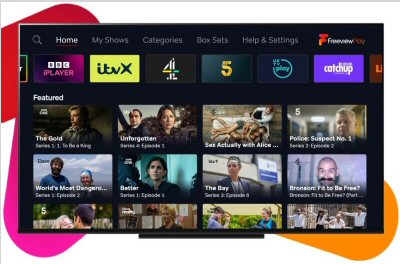
Source: FreeViewPlay
The government has delivered its verdict on the proposed UK VPN ban
Privacy advocates can breathe a sigh of relief.
The UK government has ruled out plans to ban or restrict virtual private networks (VPNs) after the technology found itself thrust into the spotlight following the introduction of the Online Safety Act last year.
While it never seemed like an outright ban was on the cards, the government began exploring whether to expand age verification to VPNs in March, following a surge in VPN downloads after age checks were introduced for adult websites.
On 2 March, the Department for Science, Innovation and Technology launched a public consultation on children's online safety...

VPN Continued
...As part of the consultation, the government sought views on whether social media should have a minimum age limit, whether there should be restrictions on design features that encourage excessive use, and whether the use of VPNs should be restricted.
Specifically, the government looked to find out whether universal age checks should be required to access VPNs and what impact such measures could have on people who rely on the services for privacy and security. It also explored how children are bypassing online safety rules, including whether VPNs are being used to circumvent age checks, whether any restrictions could realistically be enforced and whether age verification for VPN services could have unintended consequences.
Source: bitcatcher.com
********************************************************
More Emojis
Microsoft adds..
Release Preview Builds 26100.9539 and 26200.9539 bring remapping to the Copilot key alongside Emoji 17.0 support and File Explorer tweaks.
Since these are Release Preview builds, many of the included changes have already been seen during earlier Insider testing.
Move over iPhone Duo announcement, the real news is here. Windows 11 will soon feature a few more emojis. Microsoft recently shipped Windows 11 Builds 26100.9539 and 26200.9539 to Insiders in the Release Preview Channel. Among other changes, the update adds support for Emoji 17.0...Contd..
..Bigfoot and Copilot..
Emoji
New! This update adds support for Emoji 17.0, including new emoji such as distorted face, fight cloud, and hairy creature. To insert them, press Windows key + Period (.) to open the emoji panel.
New! This update also refines the design of several existing emoji for better consistency across platforms, including saluting face, face with peeking eye, goose, lotus, and kissing cat.
Read more about it and other news at Windows Central & News By Sean Endicott
.. key re-mapping
..contd..Several changes have been made to File Explorer that should make for a smoother experience. Home within File Explorer now preserves the state of sections, so the next time you open the app things will be expanded or collapsed as before. Thumbnail previews for cloud files should appear more consistently as well following this update.
Emoji lovers will be happy to hear that Emoji 17.0 support comes with this build of Windows 11. Emoji 17.0 adds the distorted face, fight cloud, and hairy creature (Bigfoot) emojis.
********************************************************
Contact Me
Steve Mugridge
20 Maple Walk
Aldershot,
GU12 4AW. UK.
Hope to hear from you soon.
********************************************************
Thank you for visiting scsaldershot.com
Please let your friends and colleagues know we are here
Sale Now On Selected Products / Services
Please note: • Errors and omissions excepted (E&OE) on this site
********************************************************