

If you see a s then somethings in the Sales!

scsaldershot (SCSA) and Technology Solution Services (TSS), trading partners for over 20 years!
Proudly serving our clients in Aldershot & the surrounding areas! See our affordableplans & area map
Welcome to and thanks for visiting scsaldershot.com
Especially to those from our scsaldershot.me.uk site.
We hope, with our easier to see links(in blue), you'll to find what you want. If not Call and we'll try and find it!
Steve at scsaldershot and in association with Gary at Technology Solutions Services (TSS) are dedicated to
providing quality computers and expert repair services tailored to meet the needs of both individuals and small businesses.
A Remote Support service is also available.
Our mission is to deliver reliable and approachable services to our local community,
ensuring that every customer leaves with the best technology solutions available and a big smile on their face.
With 60+ years of combined computing experience, we are sure that we can help you finding the perfect computer,
reliable accessories or provide expert repairs to get you back up and running.
We'll assist you in every way we can.
You can also check out our In Stock & Available to Order(A2O) List Here(Searchable)
Please note: • Errors and omissions excepted (E&OE) on this site
Some images on this site may have been created using AI
********************************************************
Call Out and Labour Fees

Description
Call Out and Labour up to 8 hours on site,
depending on your chosen option.
A technician will call to your home/office,
to carry out any repairs, upgrades or
installations required.
We will be in touch ASAP
to arrange our visit.
Please note:-
Not all repairs can be carried out on-site.
We look forward to helping you.
See our Affordable Plansand our Area Map
********************************************************
Computer Services
We provide expert repair services for all types of desktop computers and laptops with the exception of Apple iMacs,
although we can probably point you in the right direction for Apple repairs. Whether you're experiencing hardware malfunctions, software issues, or need upgrades,
we are here to help.
We ensure your systems are back up and running smoothly in no time!
Services also include the following:-
• Virus & Malware Removal • Software Installations • Back-up Solutions • Data Transfers(When possible) • Laptop screen replacement
• System upgrades including Graphics Cards & SSDs • Windows 10 to Windows 11 - If your hardware is compatible.
Please note: Windows 11 upgrades are only done in store as they can be a lengthy process - keeps your costs down.
• Home / Office Networking • Broadband Installation • Remote Support Service.
Affordable repair plans
Choose a plan that matches your lifestyle and tech requirements, then give us a call.
Please note that in some unforeseen circumstances you may still be charged
if or when our diagnostics and investigations lead us to conclude that your product is unrepairable.
Rest assured we will always do our best!
Basic In-Store at TSS Plan.
£69.00
Fixed Labour Price
Designed for active people who are able to stop by the service center at 4 Camp Road, Farnborough, GU14 6EW to drop off their computer or laptop.
• Troubleshooting & diagnostics
• Fixed price repair plus any parts required
• 12 Month standard warranty on new parts
• Testing Equipment
• Data Transfer & Recovery where possible
• Software Installations
• 1, 3 or 5 hours work, same fixed price
Price + Parts
Popular In-Store at TSS Plan.
£88.00
Fixed Labour Price
For those who prefer staying in, we offer a hassle-free collection and delivery service! Just let us know where you are and we'll be there as soon as possible.
• Unplugging of equipment
• Collection
• Troubleshooting & diagnostics
• Fixed price repair plus any parts required
• 12 Month standard warranty on new parts
• Delivery
• Plugging it back in & test
• Local area, within 5 miles of base
• Additional £ 10.00 applies,
between 5 Miles and up to 12 Miles.
Price + Parts
Basic On-Site Plan
£49.00
Hourly Rated Labour Price
If you need assistance in person, whether it's configuring a new printer, setting up your home network or even some basic tuition, we've got you covered.
• Up to 1 Hour of technician time on-site
• Competitive hourly on-site rate for additional hours
• Troubleshooting & diagnostics
• 12 Month standard warranty on any new parts
• Local area, within 5 miles of base
• Additional £ 10.00 applies,
between 5 Miles and up to 12 Miles.
• Please note:
Not all repairs can be carried out on site.
Price + Parts
Local Area Coverage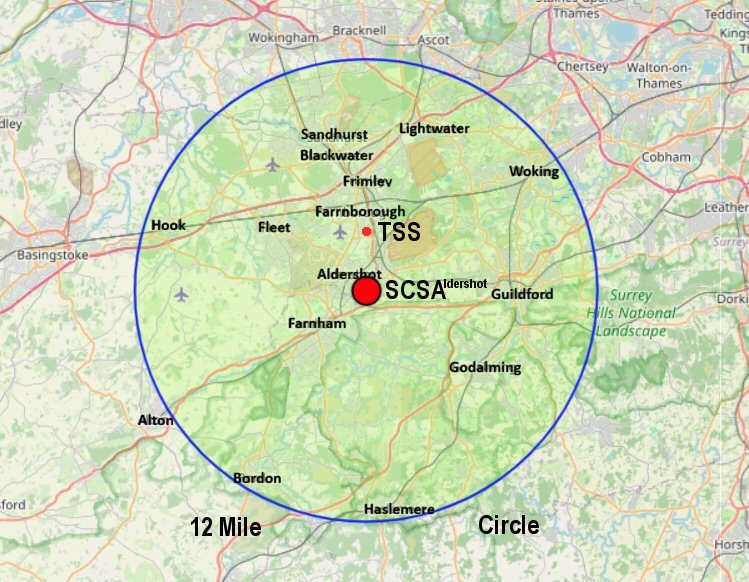
If you live inside the circled area call out is between £19.00 and £29.00
********************************************************
Remote Support
Description
Remote Support Services.
Up to 120 minutes at a time,
depending on your chosen option
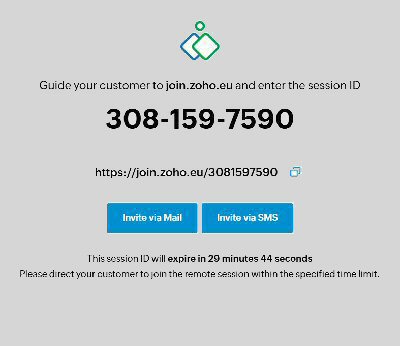
Get quick tech help without leaving your home. Once payment clears, we will book an online support session at a time that works best for you.
We recommend having your phone handy during the session so our technician can speak with you directly while resolving your computer issues.
Trusted Software:
We have securely used ZoHo Assist for many years to provide safe, reliable remote connections.
********************************************************
New Data Recovery Partner at TechnologySS
Please let TSS know you got to them via scsaldershot - Thanks
Web Design

Demo Site
Click the picture to visit
Domain extensions ending in .uk, .me.uk, or .org.uk offer the cheaper and most cost-effective pricing options.
Price Breakdown
• Domain Names start at £ 10.00 annually
• Hosting starts at £ 85.00 annually
• Administration Fee is £ 25.00
• One off Site cost is £ 340.00
These are the currents prices for Sept 2026
• Future Site Updates are at our current hourly rate
Get on the Web! Usually with 28 Days of Purchase
Description
Looking for a hassle-free online presence?
I provide a complete service covering a
Basic Website, Domain Name and Hosting.
You simply supply me with your text, photos, and idea and I will put it all together for you.
I will personally arrange your hosting and domain name
(which is always registered in your name) and upload the site to a live status (e.g., yourname.uk).
Domain names and hosting fees may increase slightly year-to-year, but price rises are usually minimal
(typically around £10.00 per year).
Our very own site
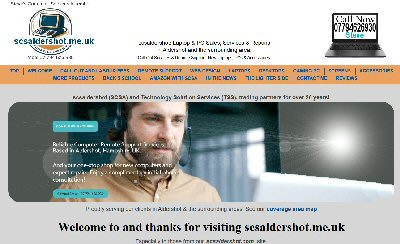
Pictures can also be made in to links
Click our site picture above to refresh the site
Another Basic site created by scsaldershot

Click the picture to see visit the site.
********************************************************
Customer Reviews
I have benefitted from Steve’s computer services and advice for at least 15 years.
He has supplied equipment and solved complex (to me) issues.
A couple of years back he ceased working due to intensive demands on his time due to family commitments
and I had to use other highly rated computer experts. They were not comparable to Steve’s expertise and problem solving lateral thinking.
I recently I heard from Gary of TSS that Steve was back in action so I contacted him and found he was more on the ball than ever!
My problems with Windows 10 to 11 upgrade and computer capacity were resolved.
He has also emphasised that if any further help is needed to get in touch without hesitation – What superb customer service.
His help can be done by remote link or a personal call out if need be.
If any anyone is having problems
I strongly recommend contacting Steve.
Roy Fairhead MBE (Home User)
The service and advice we were given when visiting this shop was brilliant, explained everything in detail and listened to what we needed.
Will definitely shop there again, thank you.
Nicki May (Home User)
Highly recommend, solved and fixed the issue with my pc! Didn’t take long and reasonably priced.
Harrison (Home User)
Thank you Steve for your expertise when my desktop stopped working Steve identified the problem and had me back up and running in a few days. Fair pricing and fab communication Would recommend and use again.
Laurence Smith (Home User)
Steve’s skill and knowledge of
“Things Microsoft” are second to none.
His awareness, tenacity, patience and empathy
made dealing with him easy and comfortable.
Using his remote access tools (with your agreement at all times)
helped follow his layman’s explanations of what he was doing and why.
Steve is most helpful and informed.
Roger (Home User)
Outstanding service! I have had the pleasure of dealing with SCSA and Technology SS (Steve and Gary) for over 20 years now. I can highly recommend the service and advice provided. Any Repairs have been dealt with expeditiously and with the highest quality of customer service and care. I have ran a small business for several years and have relied upon both Steve and Gary for all my Computer requirements (Hardware and Software.) Nothing has been too much trouble, and indeed when I have encountered any problem, advice and help is always available (many times out of hours!) Support has been excellent from Steve throughout the term of my business – he is always available at the end of a phone call to assist. If telephone advice does not resolve the issue, then as soon as practicable, a home visit is arranged. All issues, regardless of how small have been resolved upon request. My last purchase was through Gary, who provided initial support from, which computer to buy to match my requirements, to uploading all the necessary programmes and software. All this was seamlessly easy and worry free considering the sensitive nature of data stored. I was back up and running within 48 hours. Following this last purchase, I have relied upon Steve to follow through any hiccups, queries, problems, and repairs. Again, hassle free and exceptional speedy service. Either face-to-face or over the telephone / online call, I can highly recommend Steve and Gary. I would not go anywhere else for my Computer needs. Thank you for all the years of service.
E.C. A genuine and honest customer. (Home/Office User)
Our primise:
We only post,
Genuine Reviews
from Genuine Customers
The fast pace of digital technology and associated services is an everyday challenge for many users of computer-related equipment and on-line devices, especially those of a certain age attempting to navigate their way accessing information and digital forms of communication that are rapidly taking the place of conventional printed formats. Buying a new personal computer and related modem equipment introduces connectivity demands which can be very confusing or frustrating integrating all the linked devices each with numerous access codes to successfully get everything operational and providing the desired services fault-free. This is where Steve Mugridge of scsaldershot provides a highly capable hands-on consultancy solution that provides the specialised skills and computer knowledge that ensues that customers can get their digital devices up and running correctly and reliably. Fault-finding and trouble-shooting requires in-depth digital experience and knowledge and Steve can and does provide such good value help and advice when needed and can be thoroughly recommended.
Richard G (Home User)
I'm pretty savvy with computers but when my laptop failed to POST, I was stumped. I took the machine to Gary and he had it fixed by the next day. I can't recommend this company highly enough - local, know what they are doing and reasonably priced. Thanks TSS!
Dave Lawrence (Home User)
Superb assistance and service
Michael Clifford (Home User)
Excellent service from the start. Steve diagnosed and fixed my PC network issues within the hour!
George (Home User)
********************************************************
Contact Me
Steve Mugridge
20 Maple Walk
Aldershot,
GU12 4AW. UK.
Hope to hear from you soon.
********************************************************
Thank you for visiting scsaldershot.com
Please let your friends and colleagues know we are here
Sale Now On Selected Products / Services
Please note: • Errors and omissions excepted (E&OE) on this site
********************************************************